Hotkeys
From 10.9.0. The Home Assistant side needs the integration 10.9.0 or newer. On the HA API with a token that is not an administrator's, the connection itself needs the integration 10.9.1 or newer, as for everything else: see A Home Assistant user for the PC.
On the Capabilities page you can list key combinations with a name (ctrl+alt+h as "Meeting"). Pressing one sends an event to Home Assistant, where the device's Hotkeys event entity has one event type per hotkey name, so an automation can trigger on it. The integration also fires hass_agent_hotkey_pressed on the event bus for every press, on both transports, with the name in hotkey; that is the event for automations. (Over the HA API the app carries the press to the integration as a hass_agent_hotkey event, which is the transport, not the one to trigger on; over MQTT it goes by topic.)
A hotkey is one combination: at least one of ctrl, alt, shift, win, and exactly one other key. The key names are the ones listed under Custom commands. Only the listed combinations are registered with Windows, nothing else that is typed is seen.
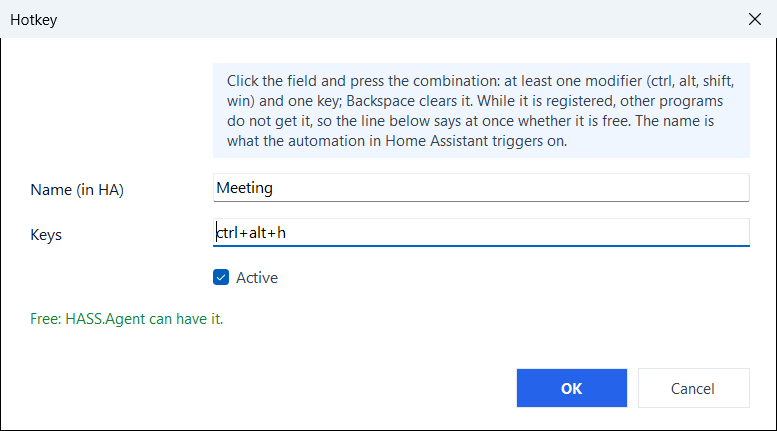
In the hotkey editor (from 10.9.1) the combination is pressed in its field rather than typed; Backspace clears it. The line under the field says at once whether the combination is free:
- Taken: Windows or another program already uses it, so it would never reach HASS.Agent. Windows keeps most
wincombinations for itself (win+1…win+9open the apps of the taskbar,win+d,win+e,win+land others), and programs such as Discord, Teams, Steam or a graphics card's overlay register their own. A taken combination is kept only when OK is pressed twice; the app tries it again every minute and it starts working once the other program lets it go. A combination Windows keeps for itself does not even show up in the field. - Another hotkey of the list already has it.
- Free, with one modifier alone (
ctrl+c,alt+f4,shift+a): Windows gives it, but programs use these themselves, and while HASS.Agent holds one they no longer get it.ctrl+altwith a letter, a number or an F key is free on most PCs.
An automation on a hotkey:
triggers:
  - trigger: event
    event_type: hass_agent_hotkey_pressed
    event_data:
      hotkey: Meeting
actions:
  - action: light.turn_off
    target:
      area_id: office
Hotkeys are handled by the tray app: they belong to the logged-in user's keyboard. Shift and Ctrl pick several rows in the list, and Remove takes them all (10.10.0+).