Services
The integration's actions, for automations and scripts. The entities' own actions (media_player.play_media, button.press, light.turn_on, select.select_option) work as with any other device.
hass_agent.send_notification
Sends a notification to a HASS.Agent notify entity, with an optional picture, buttons and text fields. The PC shows it as a Windows notification or in the client's own window:
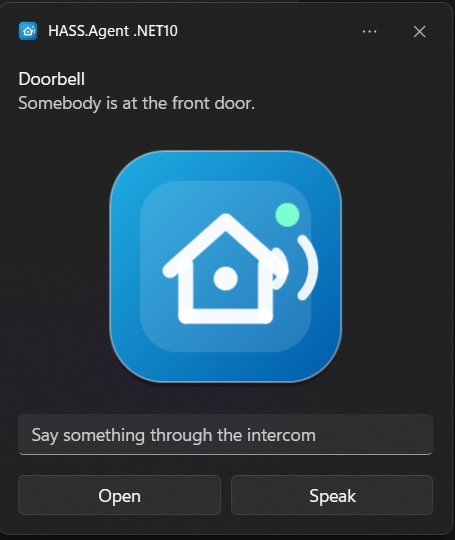
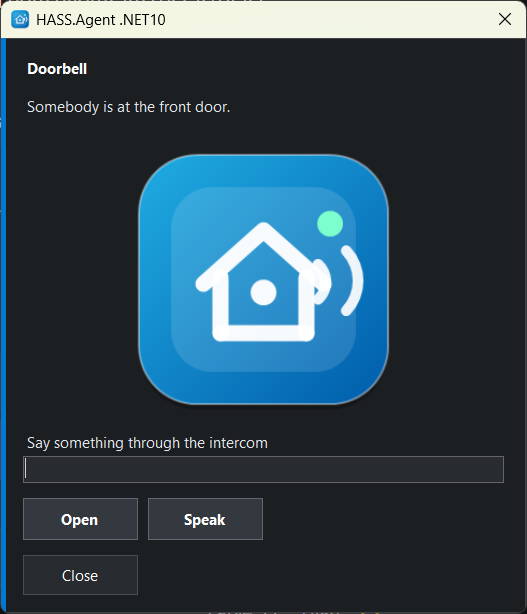
With buttons only:
action: hass_agent.send_notification
target:
  entity_id: notify.my_pc_notifications
data:
  message: "Would you like to turn on the lights?"
  title: Home Assistant
  actions:
    - action: lights_on
      title: "Turn on"
    - action: lights_off
      title: "Turn off"
Besides message and title, the action has these fields; in the Home Assistant editor each has an input of its own:
| Field | Description |
|---|---|
actions |
Buttons, each with an action (what comes back) and a title. Up to five. |
image |
A picture: a web address, a path on this Home Assistant (/local/doorbell.jpg, /api/camera_proxy/camera.front_door), or a camera or image entity (camera.front_door). A path or an entity is signed for five minutes so the PC can fetch it; only paths under /local/, /media/ and the camera and image proxies are (10.9.1+), anything else is left out. Client 10.9.0+. |
inputs |
Text fields, each with an id and a title (the hint in the empty field). Up to five. What was typed comes back with the pressed button, in input, by id. Client 10.9.0+. |
duration |
Seconds on screen, 1 to 60 (default 10). |
style |
toast (a Windows notification) or window (the client's own always-visible window), for this one notification. Without it the client's own setting decides. Client 10.9.0+. |
image,inputsandstyleneed the integration and the client 10.9.0 or newer. An older client shows the notification without them.
action: hass_agent.send_notification
target:
  entity_id: notify.my_pc_notifications
data:
  title: Doorbell
  message: "Somebody is at the front door."
  image: camera.front_door
  style: window
  inputs:
    - id: answer
      title: "Say something through the intercom"
  actions:
    - action: speak
      title: "Speak"
Before 10.9.0 these fields had to be given inside a data object of the action (data: → data: → actions:). That still works, so existing automations need no change; a field given on its own wins over the same key in data.
The press arrives on the device's Notification actions event entity and as a hass_agent_notifications event, with the typed text in input:
hass_agent.execute_command
Sends a system command to a HASS.Agent .NET10 device:
| Field | Required | Description |
|---|---|---|
device_name |
yes | Target Windows device name |
command |
* | lock, sleep, hibernate, logoff, monitor_off, volume_up, volume_down, toggle_mute, shutdown, restart |
comment |
Windows shutdown/restart comment | |
force |
Force shutdown/restart (default: false) |
|
time |
Delay in seconds (default: 0) |
|
restart_cancel |
* | Cancel a pending shutdown/restart |
* Either command or restart_cancel: true is required.
Example:
action: hass_agent.execute_command
data:
  device_name: MY-PC
  command: restart
  force: true
  time: 30
  comment: "Restarted from Home Assistant"
Cancel a pending shutdown or restart:
When the Windows service is online and capable of handling the command, the integration automatically routes it to the service topic. Otherwise it falls back to the tray app.
hass_agent.set_app_volume
Needs the Windows client 10.9.0 or newer with its Audio sessions sensor turned on.
Sets the volume of one app in the Windows volume mixer, or mutes it. The Audio sessions sensor lists the apps with their volumes as attributes.
| Field | Required | Description |
|---|---|---|
device_name |
yes | Target Windows device name |
app |
yes | The app as the Audio sessions sensor names it, e.g. spotify |
volume |
* | Volume in percent, 0 to 100 |
muted |
* | true to mute, false to unmute |
* At least one of volume and muted is required; both can be given in one call.