The Home Assistant integration
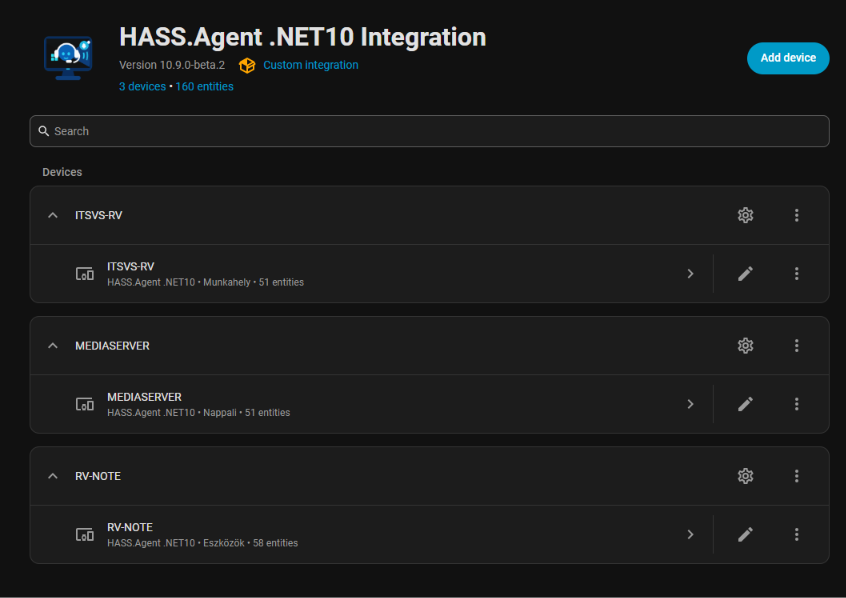
The Home Assistant side is a custom integration of its own, v1k70rk4/HASS.Agent.NET10-Integration, in the HACS default store. It creates every entity of a Windows PC from what the app advertises, over MQTT or the Home Assistant API, and removes what you switch off. The app and the integration are released with matching version numbers; a feature that needs a newer integration says so on its page.
These pages are the integration's own README, shown here so that the two sides are in one place; the README on GitHub is the original, and its changelog lists its releases.
Requirements
| Component | Minimum version |
|---|---|
| Home Assistant | 2026.6.0 |
| HASS.Agent .NET10 (Windows client) | 10.2.0 (10.9.1+ recommended) |
| MQTT broker (recommended) | Mosquitto or any MQTT 3.1.1+ broker |
HACS is required for installation. This integration is available in the HACS default store, so no custom repository needs to be added.
The Windows client installs with winget, or with the signed installer from its Releases:
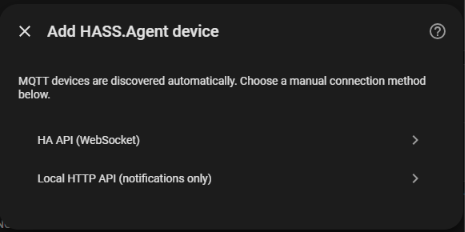
MQTT is recommended for full functionality. Alternatively, HA API (WebSocket) provides nearly the same features without requiring an MQTT broker. The Local HTTP API setup supports notifications only.
Install from HACS
This integration is in the HACS default store — no custom repository needed.

- Open HACS and search for HASS.Agent — or click the button above.
- Download the integration.
- Restart Home Assistant.
- Add the integration — click the button below (or go to Settings → Devices & services → Add integration → HASS.Agent):

With MQTT enabled in the Windows client, the PC turns up on its own under Discovered at the top of Settings → Devices & services. Like any Home Assistant discovery it waits for you: click Add on that card to create the device and its entities.
Over the HA API (WebSocket) the first PC is added by hand, here, with HA API (WebSocket): Home Assistant only lets an integration listen for new devices once it has one. Every further PC on the HA API is then discovered like the MQTT ones. For the Local HTTP API you always add it manually here.
Manual install (custom repository fallback)
If the integration isn't showing in your HACS yet, add it as a custom repository: **HACS → ⋮ menu → Custom repositories**, URL `https://github.com/v1k70rk4/HASS.Agent.NET10-Integration`, category **Integration**.If another HASS.Agent integration is already installed, remove it before installing this one, then restart Home Assistant.
Every PC is a device of the integration. Add device is for the two ways that are not discovered on their own:
Features
- MQTT auto-discovery for HASS.Agent .NET10 devices
- Media player entity for playback control, volume control, media browsing, TTS, and album art
- Notify entity for sending notifications to the Windows client
- Notification action triggers for automations
- Notification action event entity for newer Home Assistant automation workflows
- Button entities for Windows commands: lock, sleep, monitor off, volume, shutdown, restart, restart cancel
- Custom command button entities: user-defined programs, PowerShell scripts, key presses, links and popup windows advertised by the Windows client
- System sensor entities for Windows machine state (CPU, memory, disk, battery, network, session, etc.)
- Custom sensor entities: process running, service status, disk free, built-in attribute extraction, command output, LibreHardwareMonitor values
- Dynamic sensor handling based on what the Windows client advertises
- Automatic removal of disabled command and sensor entities
- Service-aware command routing for system commands handled by the Windows service
- HA API WebSocket failover transport for device, sensor, media, and notification action events
- Serial-number based MQTT topic and HA API command routing
hass_agent.execute_commandservice for scripts and automations- With the client 10.9.0 or newer: the PC's display as a light, select entities for the default audio output and input device, a Hotkeys event entity, and the
hass_agent.set_app_volumeservice - Local HTTP API setup for notification-only use cases (with API key authentication)
- Hungarian and English translations